In 2026, Adobe Firefly 4 has emerged as one of the most powerful AI tools for designers, marketers, content creators, and businesses. By combining the creative legacy of Adobe with cutting-edge artificial intelligence, Firefly 4 offers a seamless way to generate images, videos, 3D assets, and more — all from simple text prompts.
Whether you are a beginner exploring digital design or a professional looking to accelerate workflows, Adobe Firefly 4 provides intuitive tools that make creativity faster, smarter, and more efficient.
Evolution of Adobe Firefly: From Version 1 to Version 4
Adobe has continuously upgraded its Firefly platform over the years:

| Version | Key Features |
| Firefly 1 | Basic text-to-image generation and simple text effects |
| Firefly 2 | Introduced vector art creation and generative fill |
| Firefly 3 | Integrated AI into Photoshop & Adobe Express |
| Firefly 4 | Added text-to-video, 3D asset generation, real-time image creation, and Firefly Boards |
Firefly 4 represents Adobe’s most advanced creative AI platform yet, offering new capabilities that streamline content creation across various mediums.
Key Features of Adobe Firefly 4
1. Text-to-Image Generation
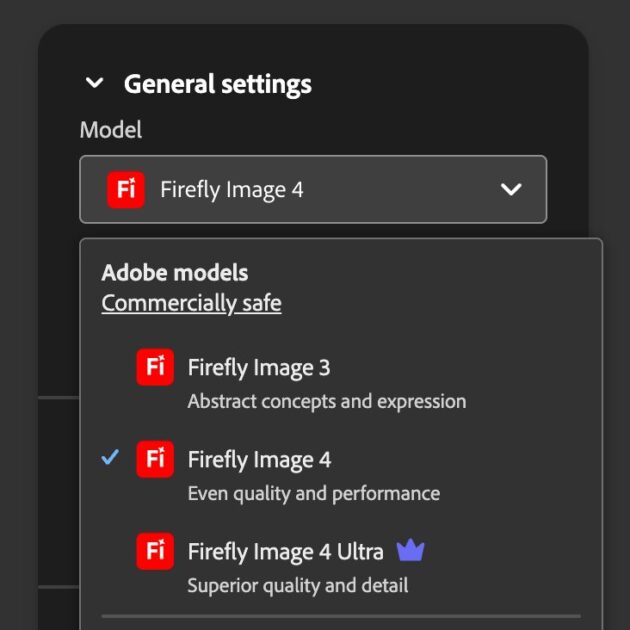
Firefly 4’s upgraded Image Model 4 transforms detailed prompts into realistic and high-quality visuals. Users can create illustrations, marketing banners and posters and social media content.
The AI understands nuances like lighting, color depth, and perspective, making the output visually stunning.
Example Prompt: “A serene Japanese garden at sunrise with cherry blossoms and a small wooden bridge, ultra-realistic style”
2. Text-to-Video (Beta)
One of the most anticipated features in Firefly 4 is text-to-video generation. By describing a scene, users can create short animated clips for storytelling, advertisements, or social media content.
Example: “A futuristic city at night with flying cars and neon lights, cinematic style”
This opens new doors for creators to produce video content without expensive equipment or complex editing software.
3. Generative Fill in Photoshop
Firefly 4 fully integrates Generative Fill into Adobe Photoshop, allowing users to remove or replace backgrounds, add or modify objects in images and maintain layer control for further edits. This feature is ideal for photo manipulation, advertising, and product visuals.
4. Firefly Boards
Firefly 4 introduces Boards, a collaborative workspace similar to Pinterest. Teams can collect generated assets, organize designs and share and provide feedback in real-time. This is especially useful for design agencies, marketing teams, and educational projects.
5. AI-Powered Text Effects & Recolor
Users can apply AI-powered text styles or recolor entire designs based on thematic requirements. This ensures brand consistency and visually appealing results with minimal effort.
6. 3D Object Generation (Experimental)
Firefly 4 also explores text-to-3D model generation, aimed at game developers, AR/VR creators and product designers. While still in beta, this feature adds a new dimension to creative possibilities.
7. Audio Prompting (Coming Soon)
Adobe is testing AI-generated audio from text prompts, including sound effects, music tracks and voiceovers. This will allow creators to combine visual and audio content seamlessly.
Seamless Adobe Creative Cloud Integration
Firefly 4 is integrated across the Adobe ecosystem:
| Tool | Key Firefly Features |
| Photoshop | Generative fill, object removal, background editing |
| Illustrator | AI-based text effects, vector generation |
| Adobe Express | Social media graphics, templates |
| Premiere Pro | AI video generation, scene enhancement |
| After Effects | AI motion graphics (coming soon) |
This cross-app integration streamlines creative workflows, letting users generate, edit, and publish content without switching platforms.
Step-by-Step Guide to Using Adobe Firefly 4
- Sign in: Go to firefly.adobe.com and log in with your Adobe account.
- Select a Tool: Choose from Text-to-Image, Generative Fill, Text Effects, Text-to-Video, or Recolor.
- Enter a Prompt: Write a detailed description, e.g., “a tranquil forest landscape at sunset, cinematic lighting”
- Generate Content: Firefly 4 will produce multiple options to choose from.
- Edit & Export: Customize layers, colors, or styles and export to Photoshop, Illustrator, or Express.
Who Can Benefit from Firefly 4?
1. Digital Marketers: Quickly generate ad creatives, design social media banners and produce product visuals in seconds.
2. Content Creators: Create thumbnails, posts, and video clips and experiment with text styles and AI-generated effects.
3. E-Commerce Businesses: Design product mockups, generate 3D assets for online stores and visualize marketing campaigns.
4. Students and Educators: Produce concept art for presentations, create learning materials in visual form and explore AI for academic projects.
5. Design Agencies: Collaborate on Firefly Boards and deliver faster and higher-quality outputs for clients.
Adobe Firefly 4 vs Other AI Tools
| Feature | Firefly 4 | MidJourney | DALL·E 3 |
| Text-to-Image | ✅ | ✅ | ✅ |
| Text-to-Video | ✅ | ❌ | ❌ |
| Photoshop Integration | ✅ | ❌ | ❌ |
| Beginner Friendly | ✅ | ❌ | ✅ |
| Commercial License | ✅ | Paid | Limited |
| Speed | ⚡ Fast | ⚠ Medium | ⚡ Fast |
Firefly 4 stands out due to its beginner-friendly interface, seamless Adobe integration, and commercial-use license.
Pros and Cons
- Text-to-video and 3D capabilities
- High-quality, realistic output
- Easy to use for beginners
- Integrated across Adobe apps
- Requires an Adobe account
- Royalty-free results for commercial use
- Some features (3D, audio) are in beta
- Certain advanced features may require a paid plan
Tips for Better AI Prompts
- Be descriptive: “a bustling market in Morocco at sunset”
- Add style hints: “in watercolor style”
- Specify lighting and angles: “top-down view, golden hour lighting”
- Include color themes: “dark blue and silver tones”
The more detailed your prompt, the more accurate and creative the results. Adobe Firefly is evolving into a complete AI creative assistant, capable of handling visual, audio, and 3D content efficiently.
Why Adobe Firefly 4 is Worth Using in 2026
Firefly 4 empowers creators to work faster, reduce production costs, enhance creativity and collaborate seamlessly. Whether you are a freelancer, marketing professional, student, or small business, Firefly 4 offers a competitive advantage in design and content creation.
Useful Resources
Final Thaughts on Adobe Firefly 4:
Adobe Firefly 4 is not just a tool; it’s a creative companion for anyone looking to combine AI and design. With text-to-image, video, 3D generation, and seamless Adobe integration, it’s a must-have for 2026.