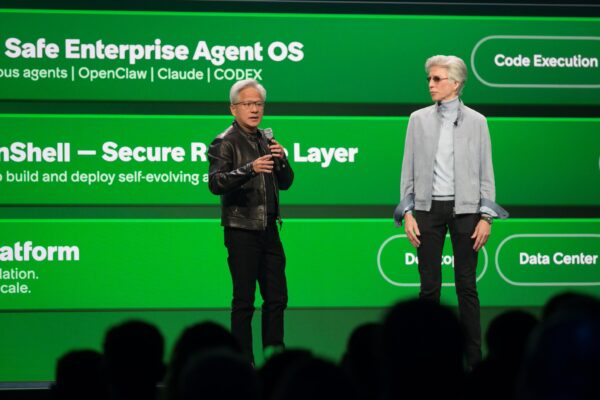
NVIDIA Nemotron 3 Ultra: How to Access and Use It for Free
Quick Summary
NVIDIA Nemotron 3 Ultra takes an interesting approach by combining a very large model architecture with a…

NVIDIA Nemotron 3 Ultra takes an interesting approach by combining a very large model architecture with a relatively small number of active parameters during inference, making it suitable for demanding AI workloads while aiming for better efficiency.
NVIDIA describes Nemotron 3 Ultra as a 550-billion-parameter open-weight model with 55 billion active parameters at a time. The model is designed particularly for advanced coding, agentic workflows, and enterprise-level research, and it supports a context window of up to 1 million tokens. NVIDIA also claims significantly faster inference compared with comparable models.
The more interesting part for developers, however is accessibility. The model can be accessed through NVIDIA’s developer ecosystem, OpenRouter and other compatible services. There are also ways to connect it to AI coding agents so that it can work directly with a software project rather than simply answering questions in a chat interface.
NLWeb by Microsoft: Transforming Website Interaction with Natural Language AI
Read StoryThis guide combines two practical approaches: accessing the NVIDIA Nemotron 3 Ultra API for free through NVIDIA’s developer platform, and connecting the model to an AI coding agent for tasks such as generating websites, modifying code, debugging projects, and handling multi-step development workflows.
What Is NVIDIA Nemotron 3 Ultra?
NVIDIA Nemotron 3 Ultra is a large open-weight AI model built for workloads that require more than simple text generation. Its intended use cases include coding, complex reasoning, multi-step agentic tasks, and research-oriented applications.
The model contains 550 billion parameters in total, while approximately 55 billion parameters are active during a given inference. This distinction is important because the model does not need to process all of its parameters for every response. The architecture is therefore designed to combine the capacity of a very large model with a more efficient inference process.
Another major capability is its 1-million-token context window. A large context window allows an AI system to work with considerably more information in a single interaction, which can be particularly useful when dealing with large codebases, extensive documentation, long research material, or complicated multi-file projects.
The model has also been positioned against other large frontier models in benchmark comparisons. The transcript specifically compares it with models such as Kimi K2 6 and GLM 5.1, highlighting the goal of delivering strong performance while maintaining efficiency.
For developers, this combination is particularly interesting because Nemotron 3 Ultra is not limited to conventional chatbot interactions. It can be connected to development tools and AI agents that allow the model to inspect files, generate code, modify projects, and complete multi-step tasks.
Where Can You Access NVIDIA Nemotron 3 Ultra?
There are several routes mentioned for accessing the model. NVIDIA’s Developer Program provides developers with access to a broad collection of AI models and API capabilities, including the newer Nemotron models. The NVIDIA model catalog is therefore the most direct starting point for developers who want an official API connection.
The model can also be accessed through OpenRouter, which provides an API layer for integrating different AI models into applications, SaaS products, automations, and other workflows. This can be useful for developers who already have an application built around OpenRouter-compatible APIs.
A third approach is particularly useful for people who want to experiment with Nemotron inside an AI coding environment. The transcripts demonstrate two different coding-agent setups: Klein inside Visual Studio Code and OpenCode through the terminal.
The important difference is that the NVIDIA Developer route focuses on obtaining an API key and making model requests, while a coding agent adds another layer on top. Instead of manually sending prompts to the API, the agent can use the model to perform practical development tasks across a project.
How to Get the NVIDIA Nemotron 3 Ultra API for Free
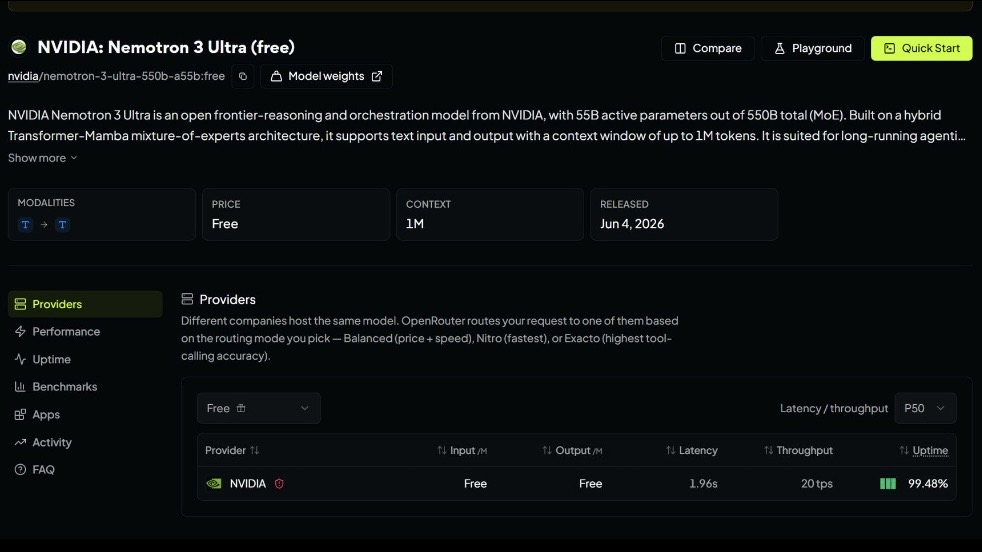
The NVIDIA Developer platform provides a straightforward way to locate the model and generate an API key. Start by visiting NVIDIA’s AI Models section and opening the complete model catalog. From there, locate the Nemotron 3 Ultra 550B model and open its dedicated page.
The model page includes different areas for interacting with and integrating the model. The Playground can be used to experiment with the model directly in the browser, while the Build section provides information needed for development. The Shell tab is particularly useful because it provides a ready-made command for making an API request.
To obtain the key, select Generate API Key from the model’s Build area. NVIDIA will ask you to sign in, after which the generated key becomes available for use with the model.
Once the key has been created, the Shell section can provide a curl command containing the required request structure. Copying and running that command in a terminal provides a simple way to verify that the API connection is working before connecting Nemotron to another application.
A successful streaming response confirms that the endpoint is accessible and that the generated API key is functioning correctly. Testing the API at this stage is useful because it separates API-access problems from any configuration problems that may appear later inside a coding agent.
Using Nemotron 3 Ultra as an AI Coding Agent
An API connection becomes considerably more useful when Nemotron 3 Ultra is connected to an AI coding environment. The transcripts demonstrate two approaches, with Visual Studio Code and Klein providing a graphical workflow and OpenCode providing a terminal-based alternative.
For the VS Code method, install the Klein extension from the Visual Studio Code Extensions marketplace. After installation, open Klein and enter its model configuration area. The setup requires three important pieces of information: the API provider, the model’s base URL, and the model name, along with the API key used for authentication.
The demonstrated configuration uses an OpenAI-compatible provider. The base URL and exact model name are obtained from the service providing the Nemotron API. After entering those values, the generated API key is added to the API key field and the configuration is saved.
The second workflow uses OpenCode, a terminal-based AI coding agent. After installing OpenCode from its official website, launch it from the terminal and use its provider connection command to configure NVIDIA as the provider.
Once NVIDIA is selected, the API key generated through the NVIDIA Developer platform can be entered. OpenCode then provides model variants for Nemotron 3 Ultra, and the transcript uses the Medium option as a balance between reasoning capability and response speed for the demonstrated coding task.
These integrations change the role of the model considerably. Instead of simply asking Nemotron to write a code snippet, the coding agent can use it as part of a larger development workflow.
What Can Nemotron 3 Ultra Actually Do?
The practical demonstration in the transcript uses Nemotron 3 Ultra to build an entire bakery website from a natural-language instruction. Rather than providing individual HTML or CSS snippets, the model is instructed to act as a professional website designer and create the project inside a new folder.
The coding agent then generates the required project files, including HTML, CSS, and JavaScript. After the generation process is completed, the resulting website contains a hero section, bakery menu cards, an about section, navigation links, and a contact form.
This example illustrates why large-context AI models can be particularly useful when paired with coding agents. A development task often involves several connected files rather than a single code block. An agent can coordinate those files while the underlying model handles the reasoning and code generation.
The same setup can also be used for other development activities mentioned in the first transcript, including coding, debugging, project generation, and multi-step agentic workflows.
For a developer, the biggest advantage is therefore not simply that Nemotron can generate code. Its value comes from being incorporated into a workflow where the model can help reason about a project and produce changes across multiple stages of a task.
Using a Free Nemotron API Through Naga AI and Klein
The first transcript demonstrates another route for developers who want to use Nemotron 3 Ultra through Klein. In this workflow, Naga AI provides access to the model along with the base URL and API credentials required for an OpenAI-compatible configuration.
After creating an account on the service, the Nemotron 3 Ultra model page provides the base URL and model identifier. These values can then be entered into Klein’s model configuration inside Visual Studio Code.
The API key is generated from the account’s API-key section. The demonstrated setup leaves the credit limit empty and sets the expiration to never before creating the key. The generated credential is then copied into Klein’s API key field.
Once the base URL, provider, model name, and API key have been entered, the configuration can be completed and the model becomes available inside the coding environment.
The transcript demonstrates the connection with a simple “hello” request. The first response takes approximately seven to eight seconds in the demonstrated setup, after which Nemotron returns a successful response.
This route is particularly interesting for developers who want to experiment with an AI coding agent without building a custom API integration from scratch.
NVIDIA Nemotron 3 Ultra vs Using It Directly Through an API
There is an important distinction between accessing Nemotron through an API and using it through a coding agent. A direct API connection is useful when building applications, testing prompts, creating automations, or integrating the model into an existing software product.
Developers have greater control over how requests are sent and how responses are processed. A coding agent, on the other hand, is designed around actual software development. It can sit between the developer and the model, turning natural-language instructions into project-level actions.
For example, a direct API request might ask the model to generate a function. A coding agent can instead be instructed to add a feature to an existing project, inspect related files, create new components, modify styles, and make the necessary code changes.
That distinction is what makes Nemotron 3 Ultra particularly interesting for agentic development. The model becomes part of a larger workflow rather than functioning only as a conventional conversational assistant.
Things to Keep in Mind Before Using Nemotron 3 Ultra
Although the transcripts demonstrate free access routes, “free” should not automatically be interpreted as unlimited access under every platform or configuration. Availability, rate limits, model access policies, and provider conditions can change, particularly when third-party services are involved.
The NVIDIA Developer route, OpenRouter, Naga AI, Klein, and OpenCode also serve different purposes. A developer should therefore choose the route according to the intended workflow rather than assuming that one method is universally better.
For experimentation, the NVIDIA model page and Playground provide a convenient starting point. For application development, an API integration may make more sense. Developers who want an autonomous coding workflow can instead connect Nemotron to an agent such as OpenCode or Klein.
It is also worth testing the API independently before configuring an agent. Running the provided shell request first confirms that the API key and endpoint work correctly. If the terminal request succeeds but the coding agent fails, the problem is likely to be in the agent configuration rather than the NVIDIA API itself.
Final Verdict
NVIDIA Nemotron 3 Ultra is interesting not simply because of its enormous parameter count, but because of the way it is positioned for practical developer workloads. Its 550-billion-parameter architecture, 55-billion active-parameter design, 1-million-token context window, and focus on coding and agentic workflows make it a model worth exploring for developers working on more complex AI-assisted projects.
The two access methods demonstrated here also show how flexible the model can be. NVIDIA’s own developer platform provides a direct route to the API, while OpenRouter and compatible services offer alternative integration options. On top of that, coding agents such as OpenCode and Klein can turn the model into a more practical development assistant.
The bakery website demonstration provides a good example of this difference. Instead of stopping at a generated code snippet, the model can participate in creating an entire project containing multiple files and functional sections.
For developers interested in experimenting with advanced AI coding tools without immediately committing to a paid model, Nemotron 3 Ultra is certainly worth testing. The combination of a large context window, agent-oriented capabilities, API access, and compatibility with modern coding workflows makes it one of the more interesting open-weight AI models to explore.
Share this article
Related Articles
Continue reading similar stories.

Trending Now
Popular articles readers are exploring.

Xiaomi 17 Pro Review – The New Flagship Evolution
Lenovo Legion Pro 7i Review 2026 – The Ultimate Gaming & Creator Laptop
Vivo X200 FE Full Review in 2026: Price, Camera, Features & Performance

iPhone 17 Air Full Review: Price, Camera, Battery & Features